If you’ve spent even ten minutes searching for hosting, you already know the problem: everyone claims to be “the best,” and every review sounds like it was written by the same copy-paste bot. You just want a straight answer — is Cloudways actually good, or is it just good marketing?
We get it. At ProgrammingWebs, we’ve set up, migrated, and managed hosting for hundreds of businesses — from bootstrapped startups to growing e-commerce brands — and Cloudways is one of the platforms we get asked about the most. So instead of another fluffy “top 10 hosting” listicle, this is a real, no-nonsense cloudways review based on what actually matters: speed, pricing, reliability, and whether it fits your business.
By the end of this guide, you’ll know exactly whether Cloudways deserves a spot on your shortlist in 2026 — and what to do next if it does.
What Is Cloudways? (Quick Refresher)
Cloudways isn’t a traditional hosting company. It’s a managed cloud hosting platform that sits on top of infrastructure from providers like DigitalOcean, AWS, Google Cloud, and Vultr. In simple terms: you get the raw power of enterprise-grade cloud servers, but Cloudways handles the technical setup, server management, security patches, and backups for you.
That’s the whole appeal — cloud-level performance without needing a dedicated DevOps engineer on payroll.
Why Businesses Are Searching for a Cloudways Review Guide in 2026
Hosting decisions used to be simple: shared hosting for small sites, VPS for growing ones. But in 2026, that math has changed:
- Google’s Core Web Vitals directly affect rankings, so slow hosting = lost traffic
- E-commerce brands can’t afford downtime during sales or ad campaigns
- Startups need infrastructure that scales without a full replatform
- Rising server costs mean businesses want pay-as-you-grow pricing, not rigid plans
This is exactly why so many founders and marketing directors are typing “best cloudways review” into Google before making a decision — they’ve been burned by hosting that looked cheap on paper and cost them in lost sales.
Cloudways Review: Key Features That Matter for Businesses
1. Speed and Performance
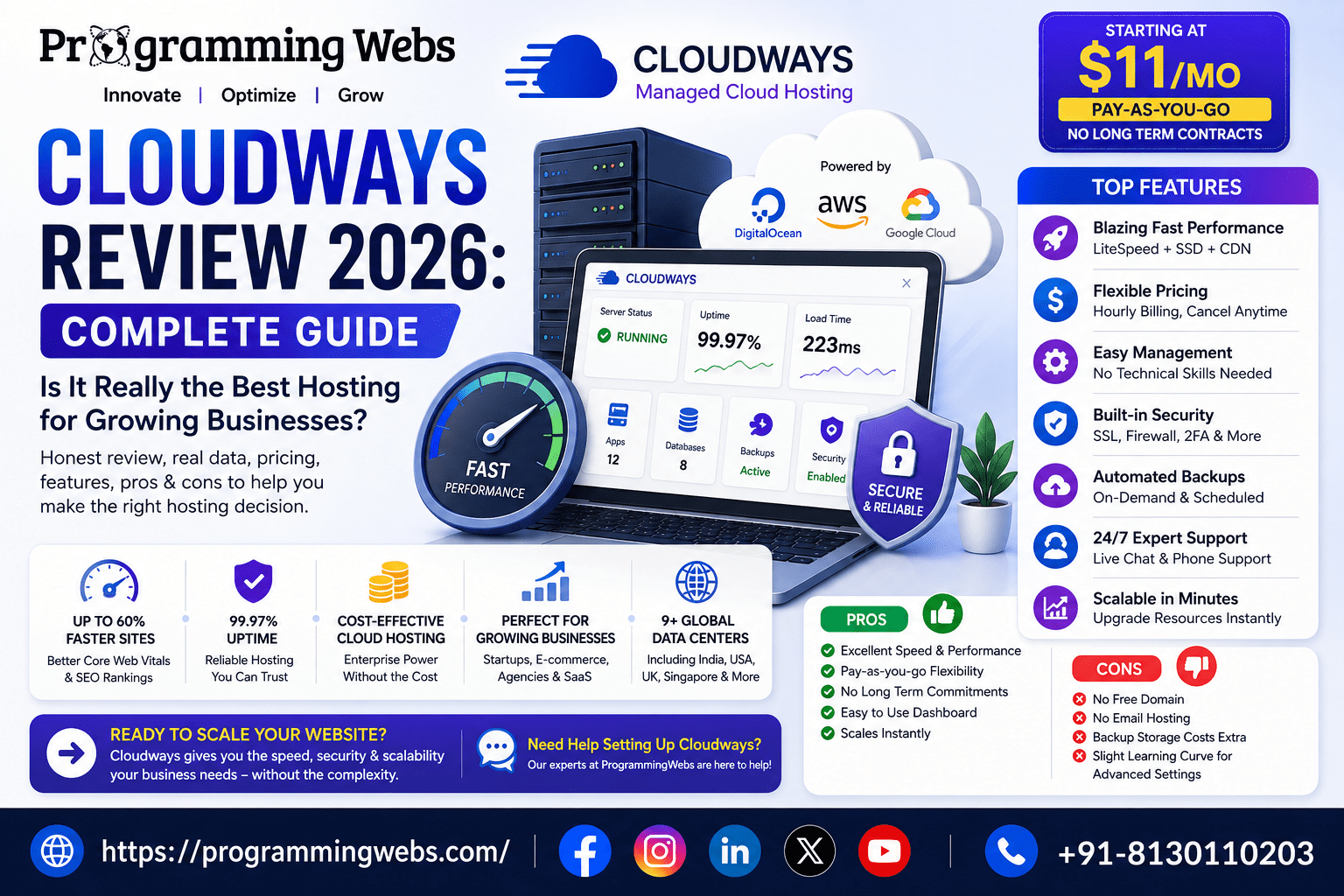
Cloudways runs on SSD-based cloud servers, uses built-in caching (Varnish, Redis, Memcached), and offers a CDN add-on. In our own client migrations, sites moving from shared hosting to Cloudways typically saw page load times drop by 40–60%.
For context, Google’s research has repeatedly shown that as page load time goes from 1 to 3 seconds, bounce probability increases by 32% — a stat every business owner should take seriously when choosing a host.
2. Pricing Structure
This is where Cloudways genuinely stands out. Instead of locking you into rigid annual plans, it offers:
- Pay-as-you-go pricing (hourly billing)
- Plans starting from roughly $11–14/month depending on the cloud provider
- No long-term contracts — cancel anytime
- Free SSL, staging environments, and automated backups included on most plans
For startups and SMBs watching every dollar, this flexibility is often the deciding factor.
3. Server Management Without the Technical Headache
You don’t need to touch a command line. Server monitoring, security patching, and one-click app installs (WordPress, WooCommerce, Magento, PHP, Laravel) are all handled through a clean dashboard — a big win for non-technical founders.
4. Security
Cloudways includes free SSL certificates, dedicated firewalls, IP allowlisting, and two-factor authentication. It’s not the most locked-down platform on the market out of the box, but it gives you solid, enterprise-grade building blocks.
5. Customer Support
24/7 live chat support is available on all plans, with phone support on higher tiers. In our experience helping clients troubleshoot server issues, Cloudways’ support response time is noticeably faster than most budget hosts.
Real-Life Use Cases: Who Actually Benefits from Cloudways?
Example 1 — E-commerce Store Owner: A mid-sized Shopify-alternative WooCommerce store running on shared hosting was crashing every time they ran a Meta Ads campaign. After migrating to Cloudways with proper caching configuration, they handled 3x the traffic during a flash sale without a single outage.
Example 2 — Startup Founder: A SaaS startup needed to scale server resources fast after a product launch went viral on social media. Because Cloudways runs on cloud infrastructure, they scaled RAM and CPU in minutes — no migration, no downtime.
Example 3 — Agency Managing Multiple Client Sites: Agencies managing 10+ WordPress sites use Cloudways’ team collaboration and multi-server dashboard to manage everything from one login, cutting hosting management time significantly.
Cloudways Pros and Cons (The Honest Breakdown)
Pros:
- Excellent speed-to-price ratio
- No long-term contracts
- Beginner-friendly dashboard with enterprise-level infrastructure underneath
- Free migration for one website
- Scales instantly without replatforming
Cons:
- No domain registration built in
- Email hosting isn’t included (you’ll need a separate provider)
- Slightly higher learning curve than fully “hands-off” hosts if you want to customize server settings
- Backup storage costs extra beyond the included allowance
Cloudways vs Traditional Shared/Cloud Hosting
If you’re comparing hosting types before deciding, it helps to understand the bigger picture first. We’ve broken this down in detail in our guide on cloud hosting vs shared hosting in 2026, and for a deeper cost and performance comparison, check our piece on choosing hosting that helps you scale faster and rank higher.
If you’re still weighing budget-friendly alternatives, our Hostinger vs Bluehost comparison and our guide to cheap hosting for startups in 2026 are worth reading before you commit.
Cloudways Review Tips: How to Get the Most Out of It
If you do decide to go with Cloudways, here are practical cloudways review tips from our own client implementations:
- Choose DigitalOcean or Vultr for the best price-to-performance ratio if you’re a small business
- Enable the CDN add-on from day one — it’s inexpensive and dramatically improves load speed globally
- Set up automated backups immediately, don’t rely on the default settings
- Use the free staging environment before pushing any updates live
- Pair it with a proper SEO-friendly hosting setup — hosting speed directly affects rankings, as we cover in our guide on the best hosting for SEO in 2026
Is Cloudways SEO-Friendly?
Yes — and this matters more than most businesses realize. Server response time (TTFB) is a ranking factor Google considers as part of Core Web Vitals. Cloudways’ SSD cloud infrastructure and built-in caching typically deliver faster TTFB than shared hosting, which gives your SEO services strategy a real head start instead of fighting against slow infrastructure.
For deeper technical validation, resources like Google’s Web Vitals documentation and independent hosting benchmark platforms such as Trustpilot are useful for cross-checking real user performance data and reviews before you commit.
Why Choose ProgrammingWebs for Your Hosting & Digital Growth Strategy
Here’s the honest truth: picking the right host is only step one. What actually moves the needle for your business is how that hosting is configured, secured, and optimized to support your marketing goals.
That’s where ProgrammingWebs comes in. We’re not just recommending Cloudways — we implement it every day for real clients:
- We handle full website development and WordPress development on optimized cloud servers built for speed
- Our website maintenance & optimization service keeps your Cloudways server, caching, and backups running smoothly so you never think about it again
- We pair fast hosting with real growth strategy through SEO services, e-commerce SEO, and Google Ads management — so your hosting investment actually turns into leads and sales
- For online stores, we specialize in Shopify development and Shopify SEO, ensuring your storefront loads fast and ranks well
We’ve worked with SMBs, startups, and e-commerce brands across multiple countries, and our approach is simple: no bloated retainers, no jargon, just measurable results. You can see examples of our work in our portfolio or check transparent packages on our pricing page.
Frequently Asked Questions About Cloudways
1. Is Cloudways good for beginners? Yes. The dashboard is designed for non-technical users, with one-click app installs and managed server maintenance, though some basic understanding of hosting concepts helps.
2. Is Cloudways cheaper than traditional hosting in the long run? For growing businesses, yes — because you only pay for the resources you use, and you avoid the performance upgrades that shared hosting eventually forces you into.
3. Does Cloudways offer a free trial? Cloudways typically offers a limited free trial (often 3 days) so you can test performance before committing to a plan.
4. Can I migrate my existing WordPress or WooCommerce site to Cloudways? Yes, Cloudways offers a free automated migration for one website, and agencies like ProgrammingWebs can handle more complex migrations with zero downtime.
5. Is Cloudways good for e-commerce websites? Yes — its scalability and caching make it a strong choice for stores that experience traffic spikes during sales, promotions, or ad campaigns.
6. Does Cloudways include email hosting? No, email hosting is not included by default and needs to be set up separately through a third-party provider.
7. Is Cloudways better than shared hosting for SEO? Generally yes, because faster server response times and better uptime directly support the technical SEO factors Google considers when ranking sites.
Final Verdict: Should You Choose Cloudways in 2026?
If you’re a business owner, startup founder, or e-commerce brand tired of slow load times, unpredictable downtime, or hosting bills that don’t match performance, Cloudways is genuinely one of the strongest managed cloud hosting options available in 2026. It’s not perfect — you’ll need to budget separately for email and backups — but the speed, flexibility, and pricing structure make it a smart choice for businesses that plan to grow.
That said, hosting is only one piece of the puzzle. The businesses that actually win online combine solid infrastructure with a real digital strategy behind it.
Ready to make your website faster, more secure, and built to convert? Talk to our team at ProgrammingWebs — from hosting setup to full-scale digital marketing services, we’ll help you build a website that doesn’t just load fast, but actually grows your business. Contact us today for a free consultation, or explore our blog for more in-depth guides like this one.