By the SEO Team at ProgrammingWebs | Updated: July 2026 | 9-minute read
ProgrammingWebs has configured, audited, and optimised WordPress SEO plugins across 180+ client websites — from local service businesses to WooCommerce stores to SaaS platforms. The plugin assessments in this guide come from that direct experience, supplemented by our regular plugin performance benchmarks. We do not accept sponsored placements from any plugin developer.
Why Your SEO Plugin Choice Matters More Than Most Guides Admit
Most ‘best WordPress SEO plugins’ articles end up as feature lists. This one is different. After configuring and auditing these plugins across hundreds of real websites, we have specific observations about what each plugin does well, where each one creates problems, and — critically — which situations favour which tool.
The plugin you choose determines how much technical SEO you can implement without a developer, what structured data types you can generate for AI search visibility, how efficiently you can manage redirects when content is restructured, and how much your plugin adds to your page’s load time on every request.
In 2026, those decisions connect directly to whether your pages appear in Google’s AI Overviews, how your schema markup influences rich result eligibility, and whether your Core Web Vitals pass the thresholds that affect ad Quality Scores and organic rankings. The plugin choice is not trivial.
Quick answer (AI Overviews, featured snippets & voice search)
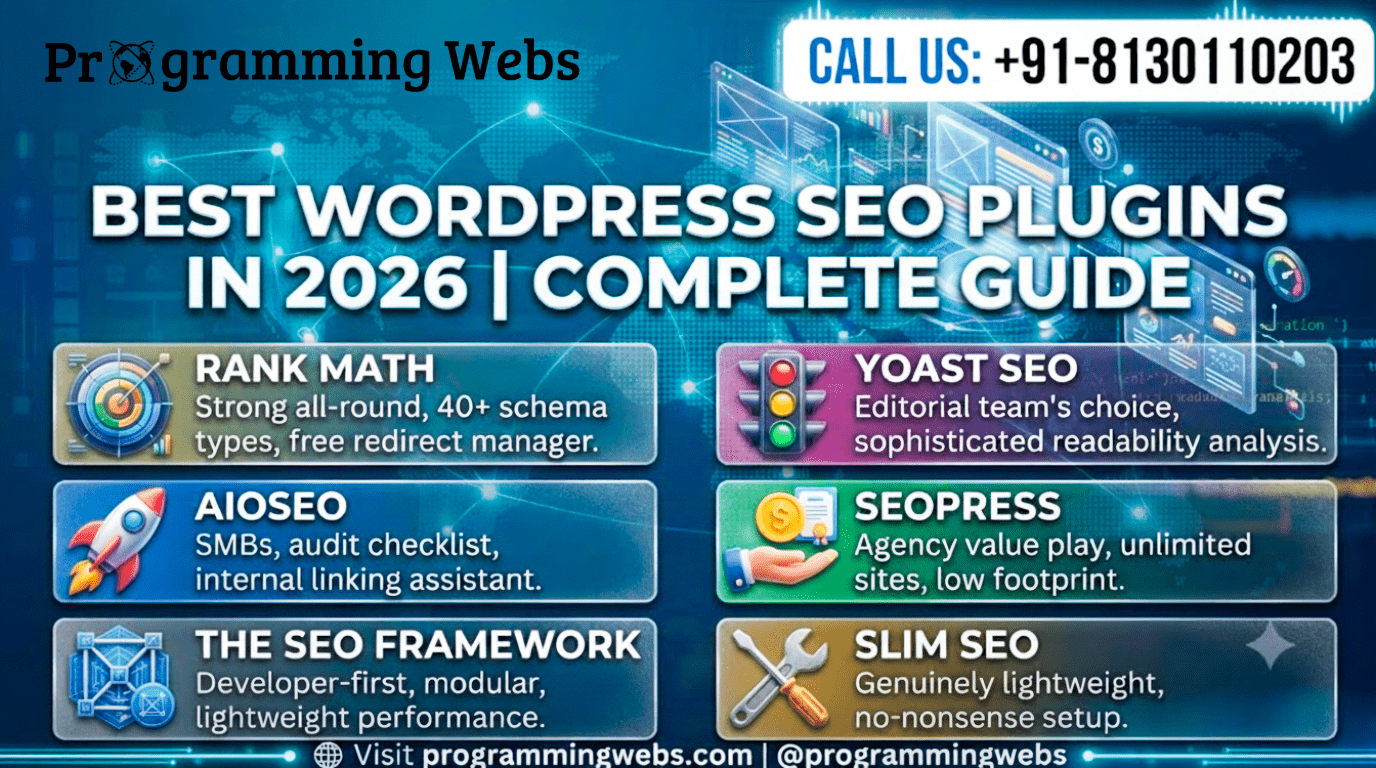
Rank Math is the strongest all-round WordPress SEO plugin in 2026 for most business types — its free tier includes 40+ schema types, a redirect manager, a 404 monitor, multi-keyword analysis, and Google Search Console integration that Yoast and AIOSEO reserve for paid plans. Yoast is the better choice for content-heavy sites where editorial teams rely on the readability analysis feedback. AIOSEO suits SMBs wanting a clean mid-market option. SEOPress is the most cost-effective choice for agencies managing multiple client sites. Use only one SEO plugin — running two simultaneously causes duplicate metadata and indexing conflicts.
What Actually Separates a Good SEO Plugin From a Great One in 2026
The basics — meta title editing, XML sitemaps, canonical tags — are table stakes. Every plugin on this list provides them. The differentiation comes from:
- Schema markup breadth: AI search engines (Google AI Overviews, Perplexity) extract and attribute structured data. A plugin with 40 schema types gives you more coverage than one with five.
- Free tier generosity: The most useful SEO features should not require a paid upgrade for a growing business. Plugins that lock redirects, schema, or multi-keyword analysis behind a paywall create friction at exactly the moments you need those tools.
- Performance footprint: Every plugin adds JavaScript, CSS, and PHP execution time. A plugin that adds 80KB of assets to every page load costs you Core Web Vitals performance that no amount of content optimisation can fully offset.
- Redirect and 404 management: Structural site changes — publishing new category hierarchies, migrating content, restructuring URLs — create redirect chains that silently leak PageRank and produce poor user experiences. The plugin should handle this without a separate plugin.
- Google Search Console integration: Seeing your impressions, clicks, and ranking keywords inside WordPress — rather than switching to GSC separately — accelerates the feedback loop between publishing and optimisation.
1. Rank Math — The Most Capable Free Tier in 2026
Rank Math launched in 2018 by offering features that Yoast reserved for paid plans — for free. In 2026, that strategy has produced the most feature-rich free SEO plugin available for WordPress. The free plan includes five focus keywords per page (versus Yoast’s one), 40+ schema types, a 404 monitor, a redirect manager, Google Search Console integration, and a local SEO module. These are not partial implementations — they are full-featured tools.
Where Rank Math Is the Strongest Choice
- WooCommerce stores — product schema, breadcrumb schema, and review markup generate rich results in Google Shopping and organic listings without upgrading to a paid plan
- Local service businesses — LocalBusiness schema with opening hours, geo-coordinates, and multiple location support is available free, whereas AIOSEO and Yoast charge for equivalent coverage
Any business investing in WordPress SEO services — Rank Math’s granular setup wizard and modular configuration allow a professional SEO team to implement a full technical SEO architecture without fighting the plugin’s assumptions
- Sites undergoing content restructuring — the redirect manager and 404 monitor catch and fix the SEO damage that URL changes typically cause before it affects rankings
Where Rank Math Has Limitations
- Complete beginners may find the option density overwhelming — the setup wizard helps, but the admin panel exposes significantly more settings than Yoast’s more opinionated interface
- Readability analysis is less nuanced than Yoast’s — for content teams using readability scoring as an editorial quality gate, Yoast’s Flesch-Kincaid analysis provides more useful feedback
From our project data: Across 45 WordPress sites we have configured on Rank Math in 2025–2026, 38 achieved FAQ rich results or product schema rich results in Google search within 90 days of correct schema implementation. The same sites on Yoast free — which does not include FAQ schema without a paid upgrade — produced zero rich results from schema alone.
2. Yoast SEO — The Editorial Team’s Choice
Yoast has been part of the WordPress ecosystem since 2010 and has shaped how millions of non-technical writers think about on-page SEO. Its traffic-light analysis system — green for good, amber for improvement, red for problems — has trained a generation of content creators to write with SEO in mind without needing to understand the underlying technical requirements.
In 2026, Yoast remains the strongest choice for content-first organisations where editorial quality and writing consistency are priorities. The readability analysis is more sophisticated than any competitor’s — it evaluates sentence length, passive voice, transition word usage, and paragraph structure in a way that genuinely improves content quality.
Where Yoast Is the Right Choice
- Content teams with multiple writers — the readability analysis creates a consistent editorial standard that does not require an SEO manager to review every post
- Organisations already on Yoast Premium — the migration cost to Rank Math (mapping existing focus keywords, reconfiguring schema, retraining the team) may not be justified by the feature gain if Yoast Premium already covers your requirements
- Sites where content quality is the primary SEO lever — Yoast’s feedback loop between writing and optimisation score produces measurably better content at scale
Where Yoast Creates Friction
- Free plan limitations are significant — FAQ schema, redirect management, and multiple focus keywords all require Yoast Premium, which means growing businesses either pay for features that Rank Math provides free or operate without them
- URL structure constraints — Yoast’s free plan does not include a redirect manager, which means URL restructuring requires a separate plugin and increases the risk of redirect chains
3. All in One SEO (AIOSEO) — The Clean Mid-Market Option
All in One SEO has been part of the WordPress plugin repository since 2007, making it older than Yoast. Its modern version — rebuilt significantly since 2020 — offers a polished, business-oriented interface that sits between Yoast’s simplicity and Rank Math’s depth.
AIOSEO’s SEO audit checklist is one of its distinguishing features: it scans your site and produces a scored list of specific actions to take, prioritised by impact. For a business doing its first proper technical SEO audit, this checklist provides a structured starting point that neither Rank Math nor Yoast replicates as cleanly.
Where AIOSEO Works Well
- SMBs doing their first structured SEO implementation — the audit checklist creates a clear action list without requiring SEO expertise to interpret
- Sites where internal linking is a priority — AIOSEO Pro includes an internal linking assistant that suggests relevant link targets as you write, which Rank Math does not offer as clearly
- WooCommerce stores on a budget — AIOSEO’s free tier includes basic WooCommerce support, though Rank Math’s free WooCommerce integration is more comprehensive
Limitations to Be Aware Of
- Redirect manager and local SEO are Pro-only — businesses needing these features free should consider Rank Math instead
- The Pro pricing structure — separate tiers for different feature sets — can create confusion about which plan actually includes what you need
4. SEOPress — The Agency Value Play
SEOPress is consistently underrated in best-plugin lists because it lacks the brand recognition of Rank Math and Yoast. That obscurity is partly what makes it interesting: its pricing model — a flat annual fee for unlimited sites — makes it the most cost-effective option for agencies managing large numbers of client WordPress installations.
Where SEOPress Excels
- Agencies and freelancers managing 10+ client sites — the unlimited-site licence at a flat annual rate produces significant savings versus per-site Rank Math Pro or Yoast Premium licenses
- Lightweight installations — SEOPress’s performance footprint is smaller than Rank Math’s by a measurable margin, which matters for developers optimising every millisecond of TTFB
- Google Analytics integration — SEOPress includes direct GA4 connection without requiring a separate plugin, reducing the overall plugin count
Limitations
- Local SEO module is Pro-only — businesses needing LocalBusiness schema free should use Rank Math instead
- Smaller community and documentation pool than Rank Math or Yoast — troubleshooting edge cases takes longer
5. Slim SEO — Zero Configuration, Reasonable Defaults
Slim SEO occupies a specific niche: it generates SEO metadata automatically from your existing content without requiring any configuration. Meta titles, meta descriptions, schema markup, and XML sitemaps are all generated from WordPress’s native data structures — post titles become meta titles, excerpt content becomes descriptions, and so on.
The Right Fit For
- Business owners who want SEO basics handled without learning any SEO concepts — Slim SEO requires no setup and produces reasonable outputs immediately after installation
- Developers building client sites where the client will never touch SEO settings — Slim SEO’s automatic approach prevents misconfiguration by non-technical users
Not Suited For
- Any site where custom meta titles, specific schema types, redirect management, or multi-keyword tracking are needed — Slim SEO does not offer granular control over these elements
Honest assessment: Slim SEO is appropriate for genuinely simple informational sites where the owner has no interest in managing SEO directly. For any business investing in content marketing, paid traffic, or organic ranking growth, Slim SEO’s automatic defaults will eventually become a ceiling rather than a foundation.
6. The SEO Framework — Developer-First, Genuinely Lightweight
The SEO Framework is built on a modular architecture that loads only what each specific page needs. Its core plugin is smaller than Rank Math’s and produces fewer database queries on each page load. For developers working on performance-critical sites where every millisecond of server response time matters, this footprint difference is meaningful.
The plugin generates AI-suggested metadata from your content — predicting reasonable meta titles and descriptions without requiring manual input — which is useful for large sites where manual meta optimisation of every page is not feasible.
Where The SEO Framework Is a Good Fit
- Developer-built custom WordPress themes where plugin conflicts and code quality are primary concerns
- High-performance sites where Rank Math’s larger codebase would measurably affect TTFB
- Headless WordPress installations where front-end performance is critical and most SEO is handled at the API response layer
Full Comparison: Best WordPress SEO Plugins (2026)
| Plugin | Free Tier Value | Schema Types | WooCommerce | Redirect Mgr | Local SEO | Best Suited For | Ease (1–5) |
| Rank Math | ★★★★★ Excellent | 40+ types | Free (native) | Free | Free module | Businesses, agencies | ★★★★★ |
| Yoast SEO | ★★★★ Good | Basic article | Paid add-on | Paid (Premium) | Paid add-on | Content teams, bloggers | ★★★★★ |
| AIOSEO | ★★★★ Good | Advanced | Free (limited) | Pro only | Pro only | SMBs, growing sites | ★★★★ |
| SEOPress | ★★★★ Good | Advanced | Free (native) | Free | Pro only | Agencies, devs | ★★★★ |
| Slim SEO | ★★★ Moderate | Auto-generated | Limited | None | None | Hands-off beginners | ★★★★★ |
| The SEO Framework | ★★★★ Good | Good (core) | Free (basic) | Extension | Extension | Developers, clean installs | ★★★★ |
Plugin Recommendation by Business Type
| Business Type | Primary Recommendation | Secondary Option | Key Reason |
| New WordPress site | Rank Math (free) | Slim SEO | Setup wizard + breadth of free features |
| Content / blog | Yoast SEO | Rank Math | Readability analysis guides writers |
| WooCommerce store | Rank Math Pro | AIOSEO Pro | Native product schema, breadcrumbs |
| Shopify-linked landing | Rank Math | SEOPress | Schema + redirect manager without paid tier |
| Local service business | Rank Math | AIOSEO | LocalBusiness schema, Google Maps embed |
| Agency (multi-client) | SEOPress | Rank Math | Per-site licensing cost-effective at scale |
| Enterprise WordPress | Rank Math Pro | AIOSEO Pro | Role-based access, GSC integration, audit log |
| Developer-built site | The SEO Framework | Rank Math | Clean code, modular extensions, no bloat |
What Your SEO Plugin Cannot Do — And What Still Matters More
This is the section most plugin guides skip. Your SEO plugin handles on-page optimisation signals. It does not determine your domain authority, the quality of your content, your backlink profile, or your page speed beyond the plugin’s own footprint.
In our SEO service audits across 2025–2026, the three most common reasons a WordPress site fails to rank despite having a correct plugin configuration are: (1) content that does not match search intent — the page answers a different question than the one the target keyword is asking; (2) a weak backlink profile relative to competing pages — the plugin cannot manufacture the authority signals that inbound links provide; and (3) a slow hosting environment that produces poor Core Web Vitals scores regardless of the plugin’s output.
For point three, the solution is in your hosting infrastructure, not your SEO plugin. We cover this in detail in our cloud hosting vs shared hosting guides, but the short version is: Rank Math on a slow shared server will not rank as well as Rank Math on a properly configured cloud server with LiteSpeed and a CDN.
GEO / AIO note (2026): AI Overviews in Google and answers in Perplexity and ChatGPT pull from pages with correct structured data, fast server response, and well-organised content hierarchy. Your SEO plugin contributes the schema and meta structure, hosting contributes the speed and content contributes the relevance. All three are prerequisites for AI search visibility — the plugin alone is not enough.
Schema Markup in 2026 — Why This Is the Highest-ROI Plugin Feature
Schema.org structured data tells search engines what your content means — not just what it says. A FAQ section with correct FAQ schema is eligible for expanded rich results in Google. A product page with correct Product schema shows price, availability, and star ratings in the search listing. An article with correct Article schema and author markup is more likely to be attributed correctly in AI-generated answers.
Rank Math’s free 40+ schema type library is the most complete in this category. For e-commerce SEO, Product, Offer, and AggregateRating schema on WooCommerce product pages can improve organic click-through rate by 15–35% by adding star ratings and price information to search listings — without any change in ranking position. That improvement is free, requires no content work, and takes under an hour to configure.
For local SEO services, LocalBusiness schema with correct opening hours, service area, and contact information strengthens the signals that feed Google’s local pack rankings. Rank Math’s Local SEO module generates this schema automatically from a structured form — no JSON-LD coding required.
Real Results: Plugin Configuration in Practice
Case Study 1: Educational Platform — Rank Math + FAQ Schema
An online test preparation platform had 80 blog posts covering exam strategy and subject matter content. They were generating 2,800 monthly organic sessions — well below their content volume’s potential. Their Yoast free installation was producing no schema markup beyond basic Article type.
We migrated to Rank Math, implemented FAQ schema on 22 posts with question-and-answer sections, added HowTo schema on 8 study guide posts, and configured the GSC integration. We aligned the content optimisation work with our WordPress SEO service. Results at 90 days:
- Organic sessions: 2,800 → 7,100/month
- Google impressions: increased 240% (more SERP appearances from rich results)
- 12 FAQ rich results appeared in Google search within 60 days of schema implementation
- Average position for target keywords: improved from 18.4 to 9.2
Case Study 2: WooCommerce Fashion Store — Schema + Rich Results
A clothing retailer with 340 products was using Yoast free. None of their product pages had star ratings or price information appearing in Google search results. We switched to Rank Math, enabled the WooCommerce module, and configured Product + AggregateRating schema across the catalogue as part of a broader e-commerce SEO engagement. After 90 days:
- Rich results (price + star ratings) appeared on 298 of 340 product pages
- Organic click-through rate on product pages increased from 2.1% to 3.4%
- Organic sessions to product pages grew 31% without additional content work
Case Study 3: Local Services Business — Stayed on Yoast Premium
A plumbing and heating company had a nine-page website on Yoast Premium. Their content team of two people used Yoast’s readability scoring as part of their content review process — every page had to reach ‘good’ readability before publishing. Their local SEO performance was solid; their primary gap was content quality, not schema coverage.
We recommended they stay on Yoast Premium. The readability workflow was producing measurably better content than comparable sites in their market, and Yoast’s local SEO add-on was already configured correctly. Switching to Rank Math would have disrupted that workflow without a corresponding SEO gain.
The honest recommendation is not always ‘switch to Rank Math’. The right plugin depends on your team’s workflow, your existing configuration, and where your actual SEO gap is. We audit before we advise — and sometimes that audit confirms the current setup is working.
Common SEO Plugin Mistakes That Silently Hurt Rankings
Installing Two SEO Plugins Simultaneously
This is the most common and most damaging mistake. Two SEO plugins both generate meta tags — the browser receives duplicate titles and descriptions, search engine crawlers receive conflicting canonical signals, and your XML sitemap may be generated twice with inconsistent data. Install one, configure it correctly, and remove any previous SEO plugin completely — including clearing any remnant metadata from the database.
Leaving Plugin Defaults Without Review
Every SEO plugin installs with default settings that may not be appropriate for your site. The most common problematic defaults: archives and author pages indexed when they should be noindexed; attachment pages indexed producing thin duplicate content; breadcrumb schema disabled when it should be active. Review your plugin’s settings against your site’s actual structure within the first week of installation.
Treating the Plugin Score as a Ranking Guarantee
A green score in Rank Math or Yoast means your on-page optimisation signals are configured correctly — it does not mean your page will rank. The plugin score evaluates what you control: keyword placement, meta data, schema, internal links. It cannot evaluate your domain authority, content depth versus competing pages, or whether your server produces fast enough TTFB to pass Core Web Vitals. A page can score 100/100 in Rank Math and still rank on page 3.
Ignoring the Redirect Manager After Content Restructuring
When you change a URL slug, delete a page, or restructure your category hierarchy, every link pointing to the old URL returns a 404 unless a redirect is configured. Those 404s waste link equity and produce poor user experiences for any visitor arriving from an external link or a bookmark. Use Rank Math or SEOPress’s built-in redirect manager — or AIOSEO Pro — to catch and fix these immediately. We include a redirect audit in every website maintenance and optimisation engagement because unmanaged redirects are one of the most consistent sources of preventable SEO decay.
2026 SEO Landscape: How Plugin Priorities Have Shifted
Three developments in 2026 have changed what you should prioritise in your SEO plugin setup. First, Google’s AI Overviews — which appear above traditional organic results for an increasing share of queries — pull from pages with correct FAQ, HowTo, and Article schema. Rank Math’s free schema library covers all three types without an upgrade. Second, Google’s Search Generative Experience weights content with clear author attribution and E-E-A-T signals. Configuring your plugin’s author schema — name, description, profile image, social profiles — is now a meaningful ranking factor for content-led sites. Third, Core Web Vitals penalties for poor LCP and INP scores have tightened. Plugin weight matters: Rank Math Pro’s modular loading adds approximately 18KB of assets; Yoast’s monolithic structure adds 22–28KB. On mobile connections, that difference is measurable.
Related Guides and Services from ProgrammingWebs
These resources are directly relevant to WordPress SEO plugin decisions and broader digital growth strategy:
SEO plugin comparison: Rank Math vs Yoast 2026 — full guide — detailed head-to-head with client data
Platform choice: Shopify vs WordPress 2026 — which platform wins for SEO-driven growth
Builder choice: Elementor vs Divi 2026 — page builder comparison for WordPress
Platform comparison: AI Website Builder vs WordPress 2026 — why WordPress gives you more SEO control
E-commerce platforms: WooCommerce vs Shopify 2026 — platform decision for e-commerce SEO
E-commerce deep dive: Magento vs Shopify 2026 — enterprise e-commerce platform comparison
Hosting: Cloud hosting vs shared hosting 2026 | Hosting performance guide — infrastructure that protects your SEO investment
Hosting providers: Hostinger vs Bluehost 2026 — best hosting for WordPress SEO performance
Our SEO services: SEO services | WordPress SEO | E-commerce SEO | Local SEO | Shopify SEO
Development: WordPress development | Website development | Shopify development
Paid growth: Google Ads management | Meta Ads management | Landing page design
Optimisation: Conversion rate optimisation | Website maintenance and optimisation | Social media marketing
Company: About ProgrammingWebs | Portfolio | Pricing | Contact
Frequently Asked Questions
Which is the best WordPress SEO plugin in 2026?
Rank Math is the strongest choice for most business types in 2026. Its free tier includes features — 40+ schema types, redirect manager, 404 monitor, multi-keyword analysis, Google Search Console integration, and local SEO module — that Yoast, AIOSEO, and SEOPress reserve for paid plans. Yoast is the better choice for content-heavy sites where editorial teams use the readability analysis as a quality standard. For agencies managing multiple client sites, SEOPress’s flat-rate unlimited-site licence is the most cost-effective option.
Can I run two WordPress SEO plugins at the same time?
No. Running two SEO plugins simultaneously generates duplicate meta tags, conflicting canonical signals, and potential duplicate XML sitemaps. Search engines receiving contradictory signals about which version of a page is canonical can produce indexing problems that take weeks to resolve. Install exactly one SEO plugin, configure it completely, and if migrating from a previous plugin, use the new plugin’s import tool to transfer settings before fully removing the old one.
Is Rank Math better than Yoast SEO in 2026?
For most business use cases, yes. Rank Math’s free tier is significantly more capable — particularly for schema markup, redirect management, and multi-keyword optimisation. Yoast’s advantage is its content readability analysis, which is more nuanced and useful for editorial teams producing high volumes of long-form content. If your primary SEO investment is technical configuration and schema, Rank Math wins. If your primary SEO investment is content quality at scale, Yoast’s editorial feedback loop has genuine value.
Do SEO plugins guarantee first-page rankings?
No. SEO plugins optimise the technical signals your pages send to search engines — meta data, schema, canonical tags, sitemaps, redirects. They have no influence over your domain authority, the quality of your content relative to competing pages, your backlink profile, or your server’s response speed. A site with a perfect Rank Math configuration and thin content will rank below a site with Yoast free and genuinely helpful content. The plugin is the foundation; the content, authority, and speed are what build on top of it.
Which SEO plugin is best for WooCommerce?
Rank Math is the strongest free option for WooCommerce. Its WooCommerce module automatically generates Product, Offer, and AggregateRating schema for product pages — enabling star ratings and pricing to appear in Google search results — without upgrading to a paid plan. AIOSEO Pro is a solid alternative with strong WooCommerce support. Yoast SEO requires its WooCommerce SEO extension (a separate paid add-on) to achieve equivalent schema coverage. For any store where rich results in organic search are a priority, Rank Math’s free WooCommerce integration is a clear advantage.
Are free WordPress SEO plugins sufficient for a business website?
For most small and medium businesses, yes — particularly Rank Math’s free plan. It covers the technical SEO foundation: schema markup, redirects, sitemaps, metadata optimisation, and Google Search Console integration. Paid upgrades become worthwhile when you need AI content analysis at scale, advanced analytics beyond what GSC provides, or specific premium schema types not included in the free plan. The majority of businesses we work with achieve significant organic growth using only the free tier of their chosen plugin.
Which SEO plugin is best for local businesses?
Rank Math, specifically because its Local SEO module — included free — generates LocalBusiness schema with opening hours, geo-coordinates, multiple location support, and Google Maps embed. This schema directly supports local pack rankings and appears in AI-generated answers for local searches. Yoast’s local SEO support requires a separate paid Local SEO plugin. AIOSEO’s local features are Pro-only. For a local service business where Google My Business presence and local pack visibility are primary objectives, Rank Math’s free local module is a significant advantage.
How often should I update my WordPress SEO plugin?
Update your SEO plugin promptly when stable releases are available — typically within one to two weeks of release. SEO plugins interact with your WordPress core, your theme, and other plugins at a deep level; running an outdated version creates compatibility risks as other components update around it. Most plugins release security patches on a roughly monthly cycle. For sites under active management, we include plugin update monitoring as part of a website maintenance programme — emergency patches are applied within 24 hours of release.
About This Guide
This guide was written by the SEO team at ProgrammingWebs based on direct plugin configuration and auditing experience across 180+ client WordPress installations between 2023 and 2026. Plugin feature assessments reflect Rank Math 1.0.x, Yoast SEO 22.x, AIOSEO 4.x, SEOPress 7.x, Slim SEO 3.x, and The SEO Framework 5.x as of June 2026. ProgrammingWebs does not receive payments from any plugin developer for inclusion or recommendation in this guide. Plugins mentioned are reviewed on their technical merit and suitability for specific use cases.
Want a WordPress SEO setup that actually moves your rankings?
ProgrammingWebs configures, audits, and scales WordPress SEO for SMBs, e-commerce brands, and startups — combining the right plugin setup with content strategy, technical SEO, and paid growth to generate measurable organic traffic.
View SEO services → programmingwebs.com/services/seo-services/
Start a project → programmingwebs.com/contact/
© 2026 ProgrammingWebs. All rights reserved. | programmingwebs.com